A Visual Resume Builder With Live Preview
Fill in simple forms and watch your resume update next to them. No templates to fight with, and no code required. If you like code, the JSON editor is one click away.
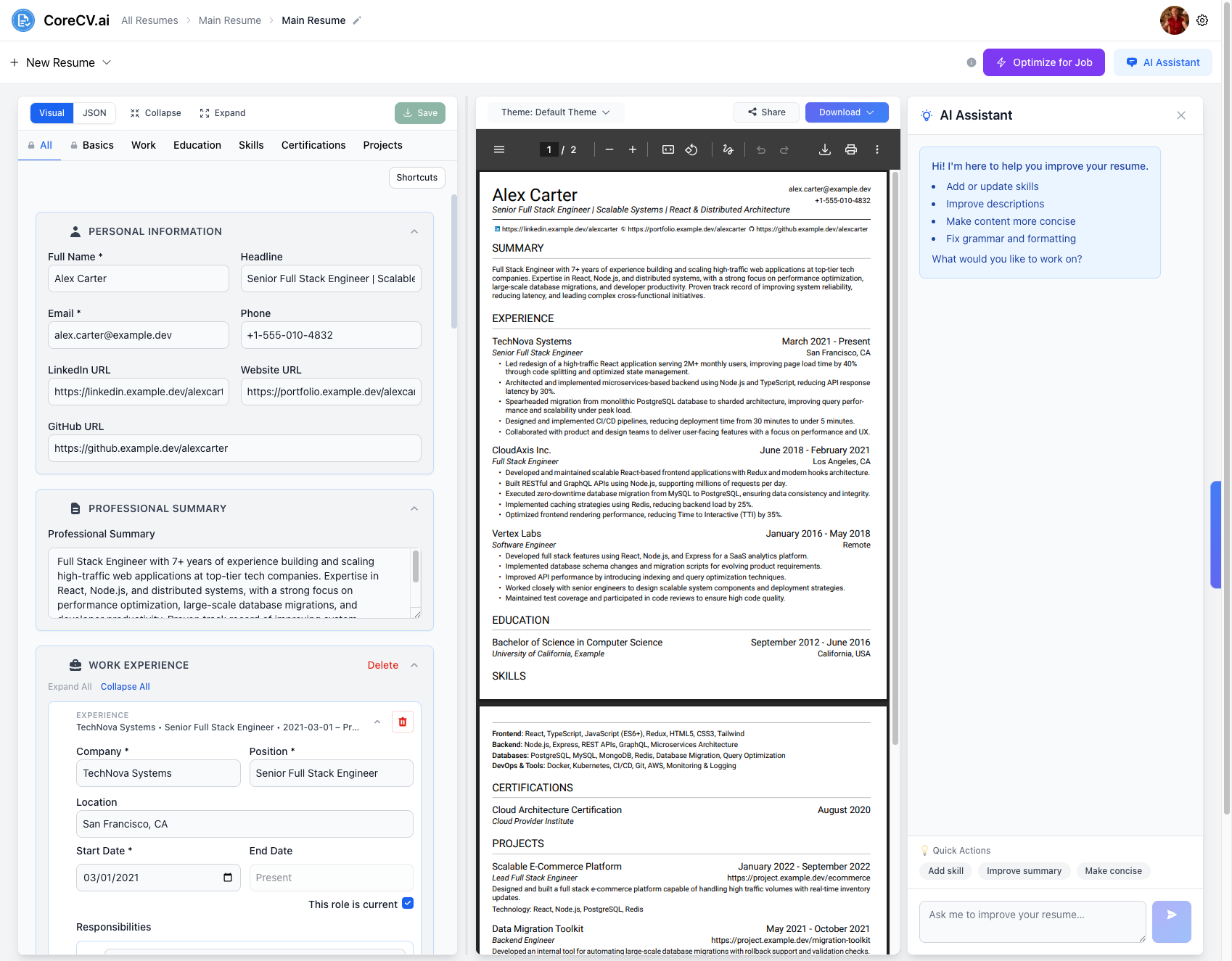
Resume editing should not be a fight
Word and Google Docs resumes fall apart the moment you add one bullet.
Most online builders hide your content behind rigid templates you cannot control.
You cannot see how a change affects the final page until you export.
Long resumes turn into endless scrolling with no way to jump between sections.
Built for fast, confident editing
Everything you edit updates a live preview, so you always see what a recruiter will see.
Live preview beside your form
Edit work experience, education, skills, certifications and projects in structured forms while the PDF preview updates beside them.
Drag to reorder
Drag jobs, projects and other entries into the order you want, and collapse the sections you are not editing. Jump between Basics, Work, Education, Skills and Projects from the tabs.
Keyboard shortcuts
A built-in shortcuts panel lists the keys that make editing long resumes faster.
JSON editor when you want it
Your resume is stored as structured data. Switch between the Visual and JSON tabs at any time and your changes stay in sync.
Build a resume in three steps
- 1
Start your resume
Upload an existing PDF, DOCX or TXT resume, or start from a blank one.
- 2
Edit section by section
Use the Visual tab to fill in each section and watch the preview update.
- 3
Pick a theme and download
Choose a theme, then download your resume as a PDF.
The visual editor is free. Some themes, AI assistance and job tailoring are part of the Pro plan, and the free plan includes one resume.
Frequently asked questions
Is the visual resume editor free?
Yes. You can create a free account and edit your resume in the visual editor. The free plan includes one resume, and some themes and AI features require the Pro plan.
Do I need to know JSON to use CoreCV?
No. The Visual tab is a regular form editor. The JSON tab is there for people who prefer to edit their resume as structured data.
Can I import my existing resume?
Yes. Upload a PDF, DOC, DOCX or TXT file and CoreCV parses it into editable sections.
Can I see my resume while I edit?
Yes. A live PDF preview sits next to the editor and updates as you change your content.
How do I get my resume out of CoreCV?
Download it as a PDF, or as a JPG image from the Download menu.
See your resume take shape as you type
Free account · Upload an existing resume or start from scratch
Free account · Upload an existing resume or start from scratch