One Master Resume. A Tailored Version for Every Job.
Stop juggling resume_final_v7.pdf. CoreCV keeps your master resume and every tailored copy together, with each version nested under the resume it came from.
Why resume files get out of hand
A folder full of near-identical files with names like final_v2_REAL.pdf.
You cannot remember which version you sent to which company.
A fix to your master resume never makes it into the tailored copies.
Tailoring for each job feels like starting over.
Organized the way job searches actually work
Your master resume is the source, and each application gets its own copy.
Tailored copies nest under the source
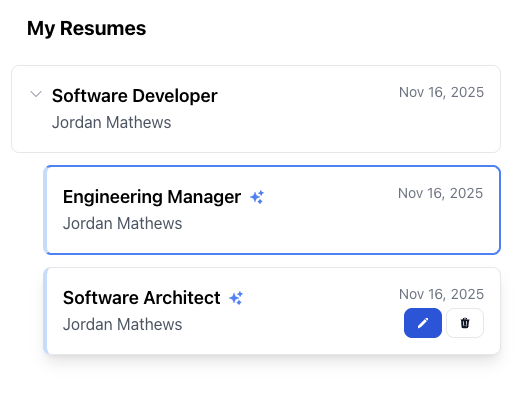
When you tailor a resume to a job, the new copy appears indented under the resume it came from, with a marker that shows it was AI-tailored.
A version per application
Keep a version for each role or company, such as Engineering Manager or Software Architect, and open any of them from one list.
Your master stays safe
Tailoring never overwrites your source resume, so you can always start over from it.
Edit any version freely
Each copy is a full resume you can edit in the visual or JSON editor, and download as its own PDF.
Build your version library
- 1
Start with a master resume
Upload your current resume or build it in CoreCV, and keep it complete.
- 2
Tailor it for a job
Use Optimize for Job with a job description, job URL or role to create a new version.
- 3
Open any version later
Find the right resume in your list, edit it and download a PDF.
The free plan includes one resume. Multiple resumes and tailoring to jobs are part of the Pro plan.
Frequently asked questions
How many resumes can I keep in CoreCV?
The free plan includes one resume. The Pro plan lets you keep multiple resumes, including tailored versions of each.
What happens to my original when I tailor a resume?
Nothing. Tailoring creates a new copy and leaves the original untouched.
How do I tell which version I tailored for which job?
Tailored copies are listed under the resume they came from, so you can see the family of versions in one place. You can open any version and check its content before you send it.
Can I edit a tailored version by hand?
Yes. Every version is a complete resume that you can edit in the visual or JSON editor.
How do I create a tailored version?
Open a resume and click Optimize for Job, then give CoreCV a job description, a job post URL or a target role.
Know exactly which resume you sent where
Free account · Multiple versions need the Pro plan (from $6.99/month)
Free account · Multiple versions need the Pro plan (from $6.99/month)